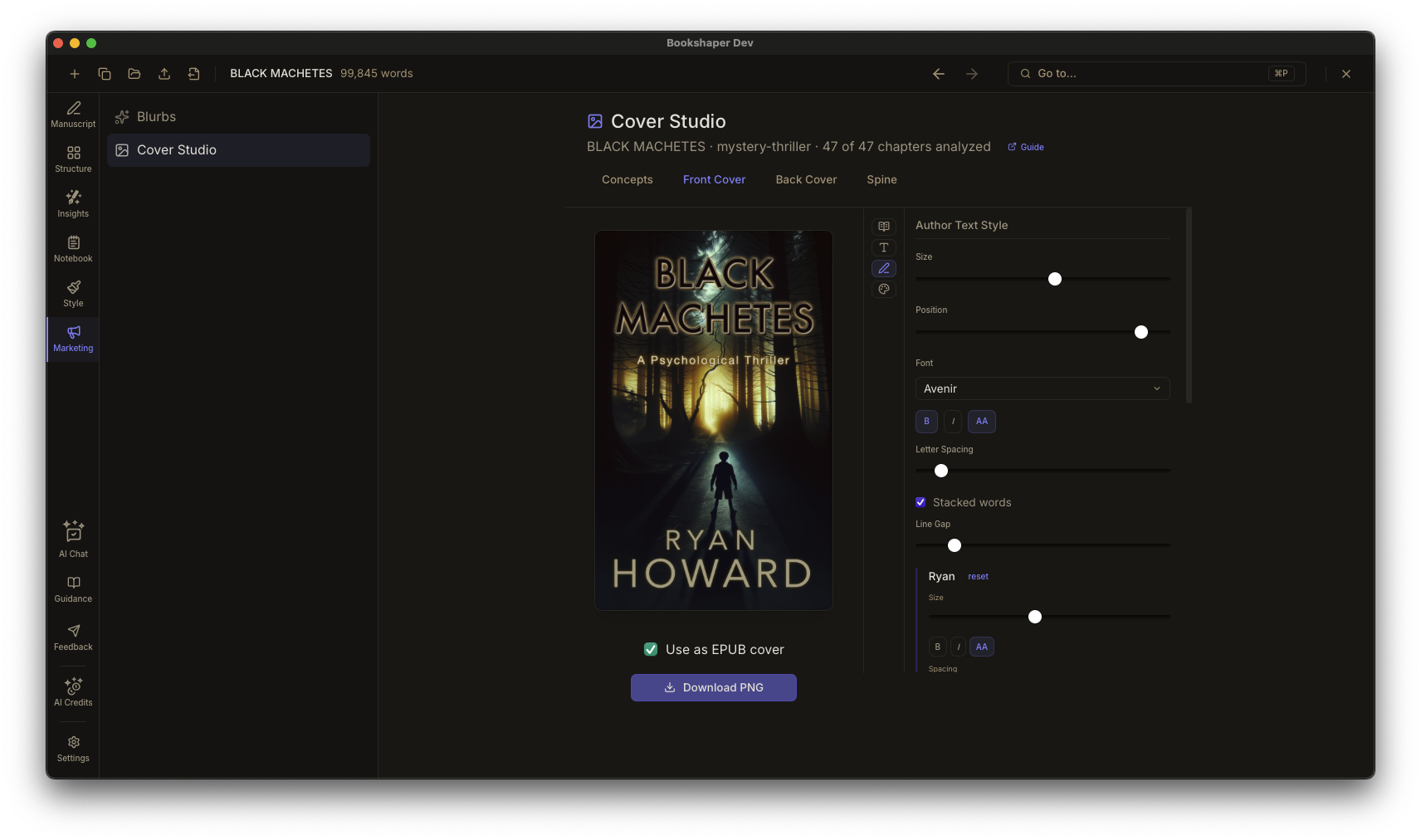
One app for your entire manuscript workflow
Write in a focused editor. Organize in card view. Analyze with AI. Track characters and continuity. Style your book. Export to EPUB and PDF. All in one place.
A focused space for long-form writing
Writing Environment
Write scene by scene in a distraction-free editor built for novels and long-form manuscripts. Rich text formatting, continuous autosave, and a manuscript preview pane so you never lose your place or your work.
- Scene-by-scene editing with rich text formatting
- Continuous autosave with 2-second debounce
- Automatic ZIP backups on a configurable schedule with retention management
- Encrypted cloud sync — manuscripts are encrypted on your device before upload, so the server never sees your words
- Manuscript preview pane for full-chapter context
- Scene audio narration — listen to any scene read aloud with professional AI voices
- Inline comments and annotations on selected text
- Typewriter scrolling and focus highlight (paragraph or sentence dimming)
- Keyboard shortcuts for fast navigation between scenes
- Focus mode for distraction-free writing
- Split editor with a reference pane for side-by-side work
- Project-wide find and replace with preserve-case for safe character renames
- Quick Open (Cmd+P) to jump to any scene, chapter, or character instantly
- Structural search operators to find scenes by character, location, or tag
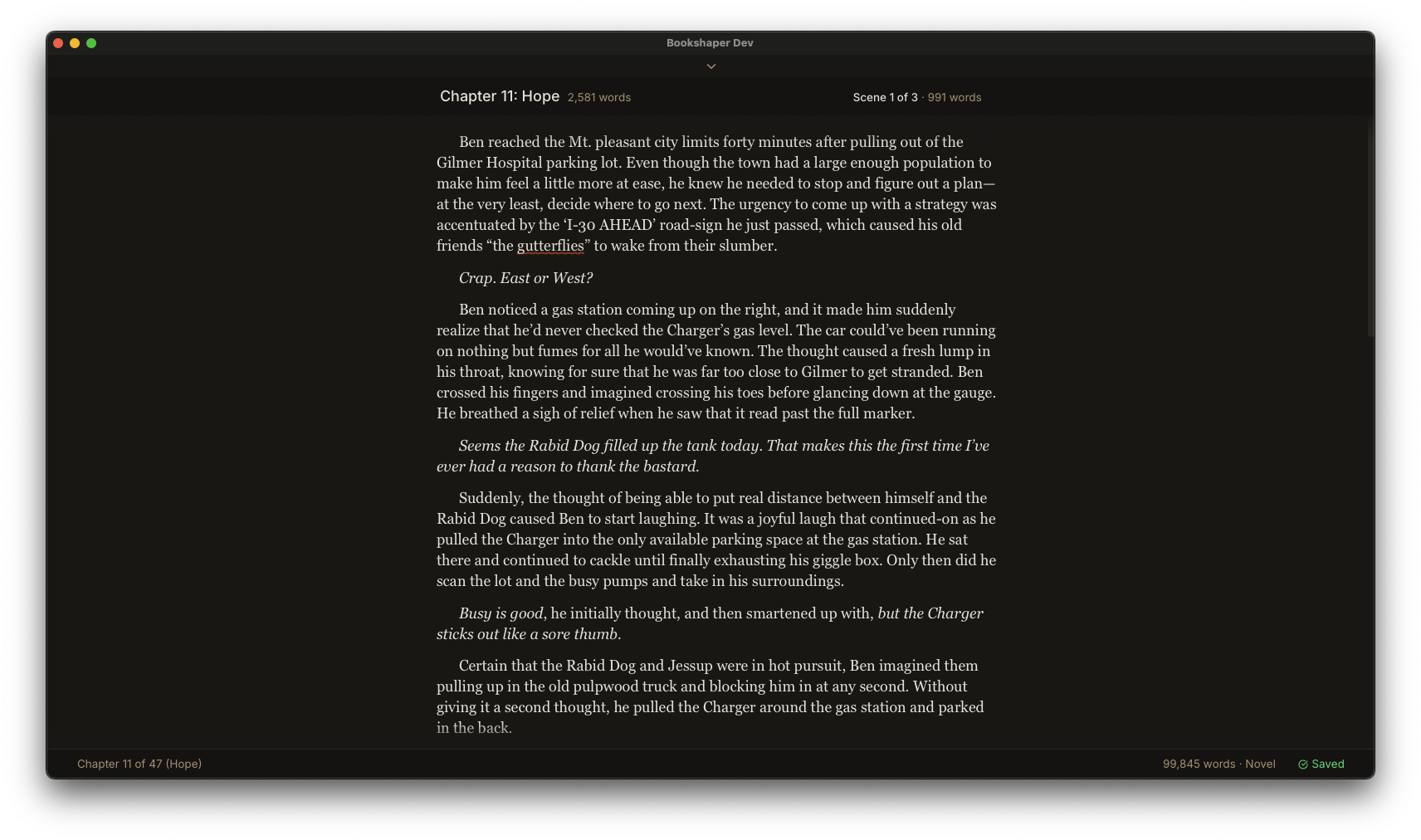
See your whole story at a glance
Manuscript Organization
Structure your manuscript with parts, chapters, and scenes. Rearrange your story in a visual card view, work from a hierarchical outline, or manage front and back matter—all without leaving the app.
- Parts, chapters, and scenes hierarchy
- Card view with drag-and-drop scene cards
- Outline view with word counts and chapter synopses
- Plot grid for visual story planning across chapters and storylines
- Front and back matter management (title page, dedication, acknowledgments, etc.)
- Metadata-driven title page, half-title, and copyright page — Vellum/Atticus-style structured fields for series, edition, publisher, co-authors, ISBN, and rights, laid out automatically by the active style template
- Series management for multi-book projects with shared characters and locations
- Split, merge, and reorder scenes freely
- Snapshots and version history—capture and restore any scene at any point
- Non-destructive reordering—nothing is lost when you rearrange
Like having an editor on call
Narrative Analysis
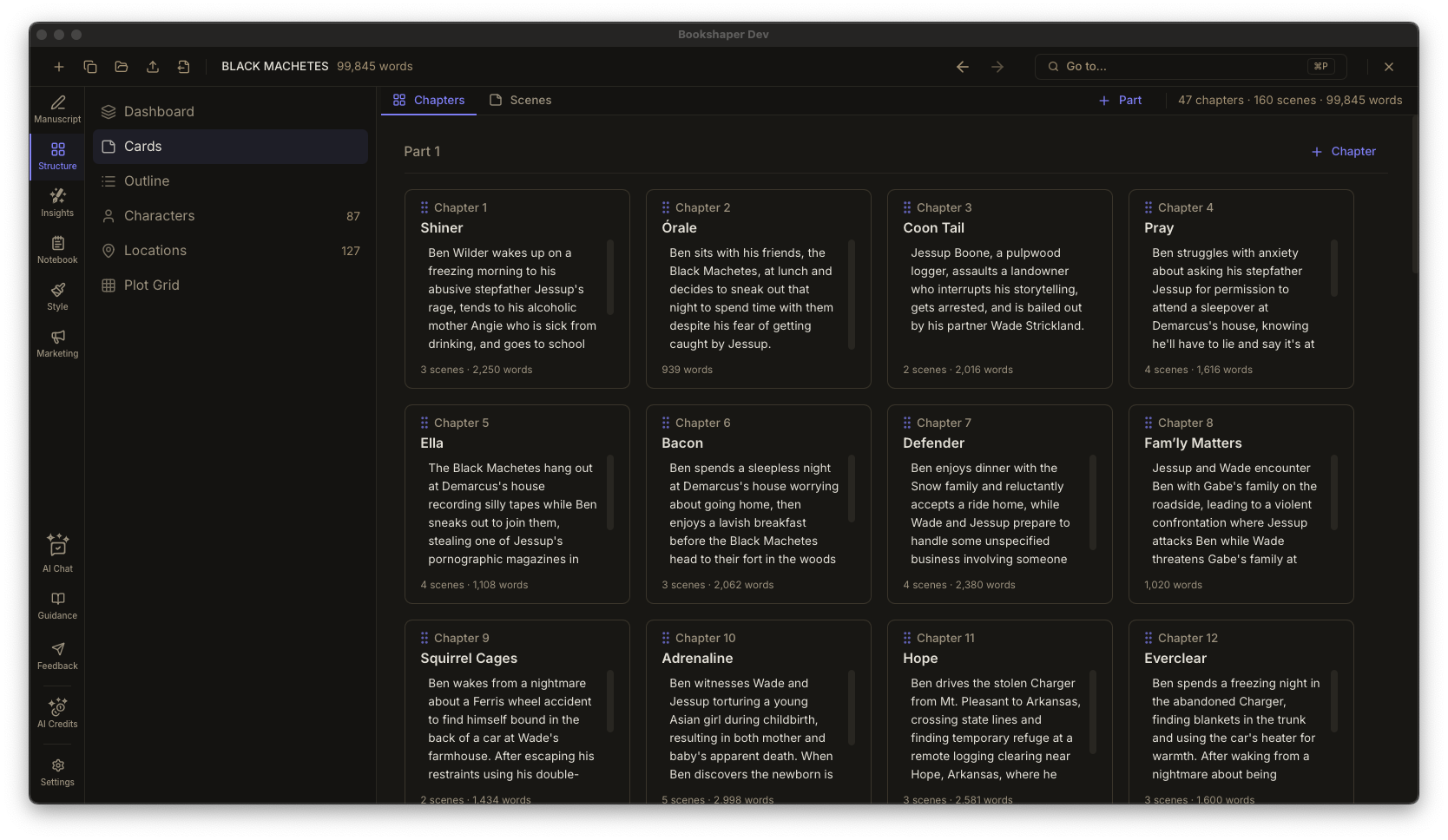
Run AI analysis and get a prioritized report card that celebrates what’s working and flags what needs attention. Every finding comes with specific, actionable guidance—not just metrics. Bookshaper tells you what to look at, why it matters, and what to do about it.
- Prioritized report card with strengths and areas for improvement
- Actionable guidance for every finding—not just flags, but what to do next
- Revision tracking—see what improved or regressed between analysis runs
- Structure, pacing, character arcs, themes, and emotional cadence analysis
- Continuity checking for timeline, characters, and world rules
- Voice and tone consistency analysis across your manuscript
- Genre-aware benchmarks that contextualize your metrics
- Manuscript-wide consistency dashboard with issue tracking and batch resolution
- AI Chat panel for conversational coaching—ask follow-up questions, brainstorm ideas, or get craft advice about your manuscript
The sharpest copyeditor never gets tired
Proofread
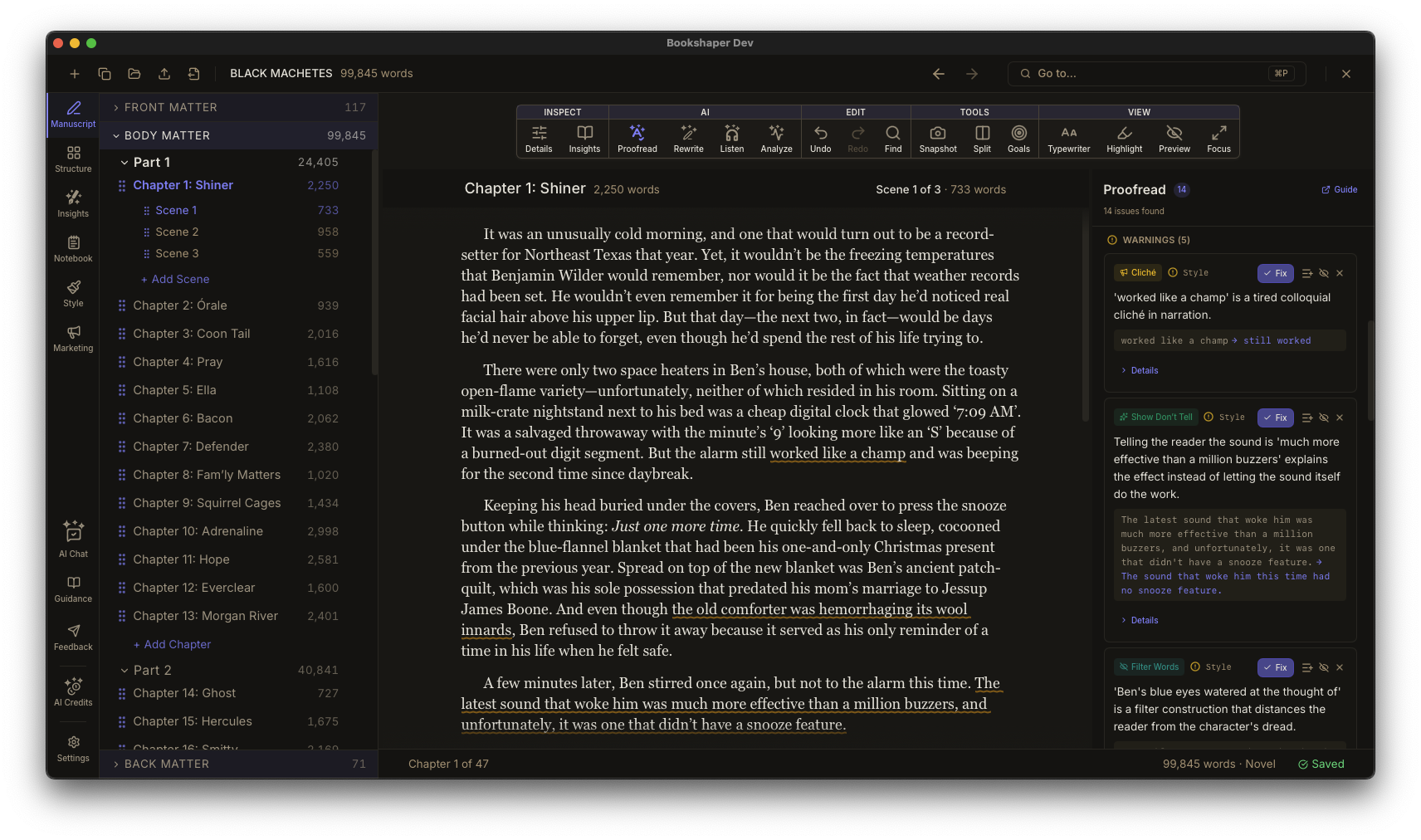
Three layers of analysis catch what your eyes miss. Spelling and grammar checks run locally and instantly. AI-powered style analysis detects deeper craft issues—show-don’t-tell, clichés, purple prose, filter words, head-hopping, and more. Click any issue to jump to the exact passage. Apply one-click fixes or dismiss with confidence.
- Spelling, grammar, and AI style analysis in a single panel
- Inline wavy underlines with severity-coded colors—errors, warnings, suggestions
- Click an issue to scroll and highlight the passage in your editor
- Click a marker in the editor to find the corresponding issue in the panel
- One-click fixes with suggested replacement text
- Dismiss individual issues or ignore entire rule categories
- Grammar layer runs locally—instant results, works offline, no usage cost
- Style layer uses AI to catch craft-level patterns: passive voice, adverb overuse, dialogue tags, sentence variety, and more
- When a style profile exists, suggestions are calibrated to your voice—intentional stylistic choices aren’t flagged as issues
- Smart matching handles curly quotes, em-dashes, and other typographic characters
Refine your prose without losing your voice
AI Rewrite & Editing
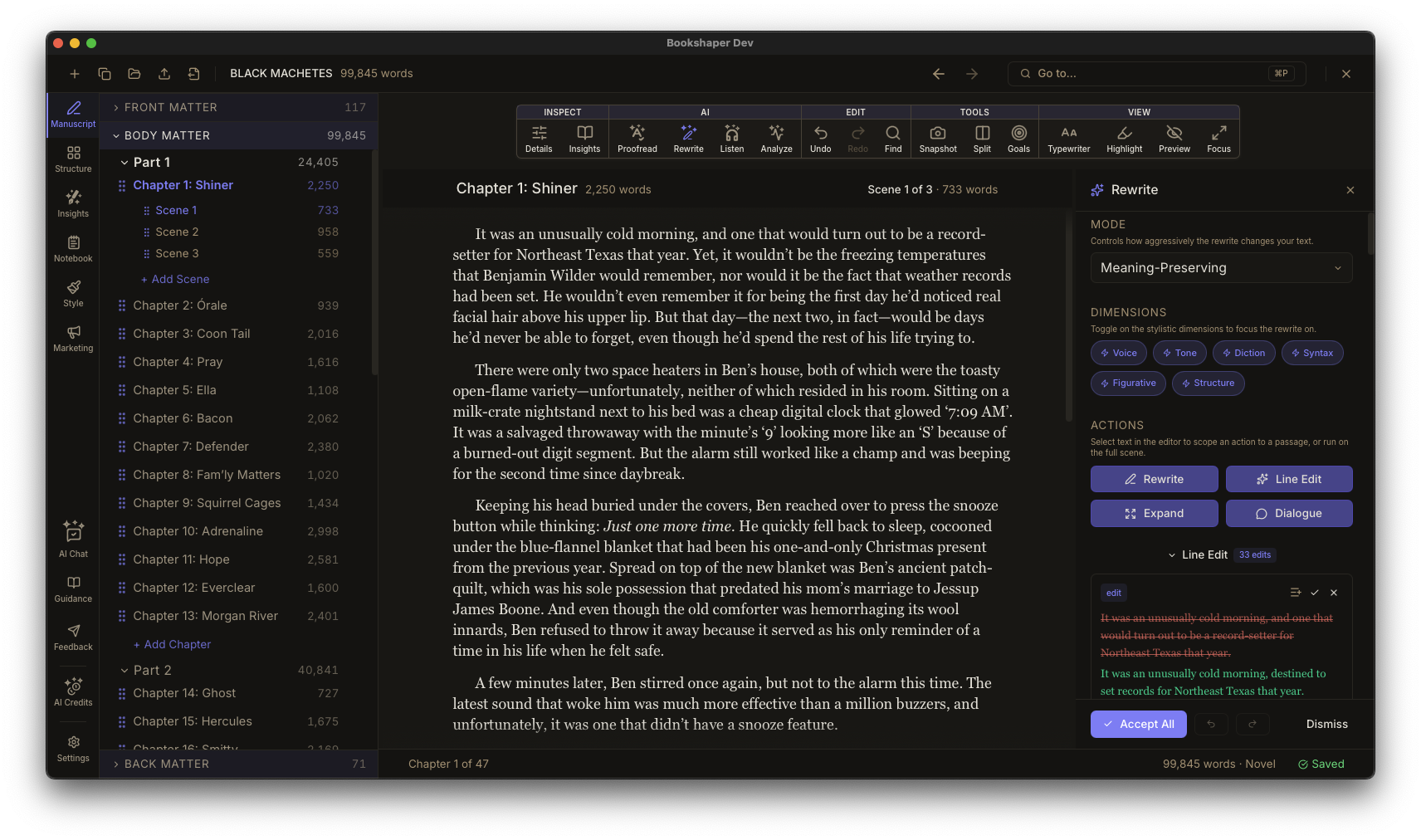
Go beyond analysis with AI-powered editing tools that help you refine scenes, tighten sentences, expand thin passages, and harmonize dialogue. When a style profile exists, every suggestion is calibrated to your voice—matching your sentence rhythm, vocabulary, and tonal register instead of applying generic editorial standards. Every change is proposed, never applied automatically. Review diffs, accept or reject edits individually, and undo anything with full history.
- All suggestions calibrated to your voice—Bookshaper learns your sentence rhythm, vocabulary, and tonal register from your style profile and writes every suggestion the way you would
- Scene rewrite with configurable dimensions: voice, tone, diction, syntax, figurative language, structural style
- Three rewrite modes: meaning-preserving, continuity-preserving, and suggestions-only
- Line edit for sentence-level clarity, rhythm, and diction refinements
- Scene expansion to develop thin passages with beat-level annotations
- Dialogue harmonization across chapters for consistent character voices
- Side-by-side diff view—transparent changes you can review before applying
- Per-edit accept and reject for line edits
- Full undo/redo history for all applied rewrites
- Batch rewrite across all scenes with a single action
Keep your story consistent from page one to the end
Characters, Locations & Continuity
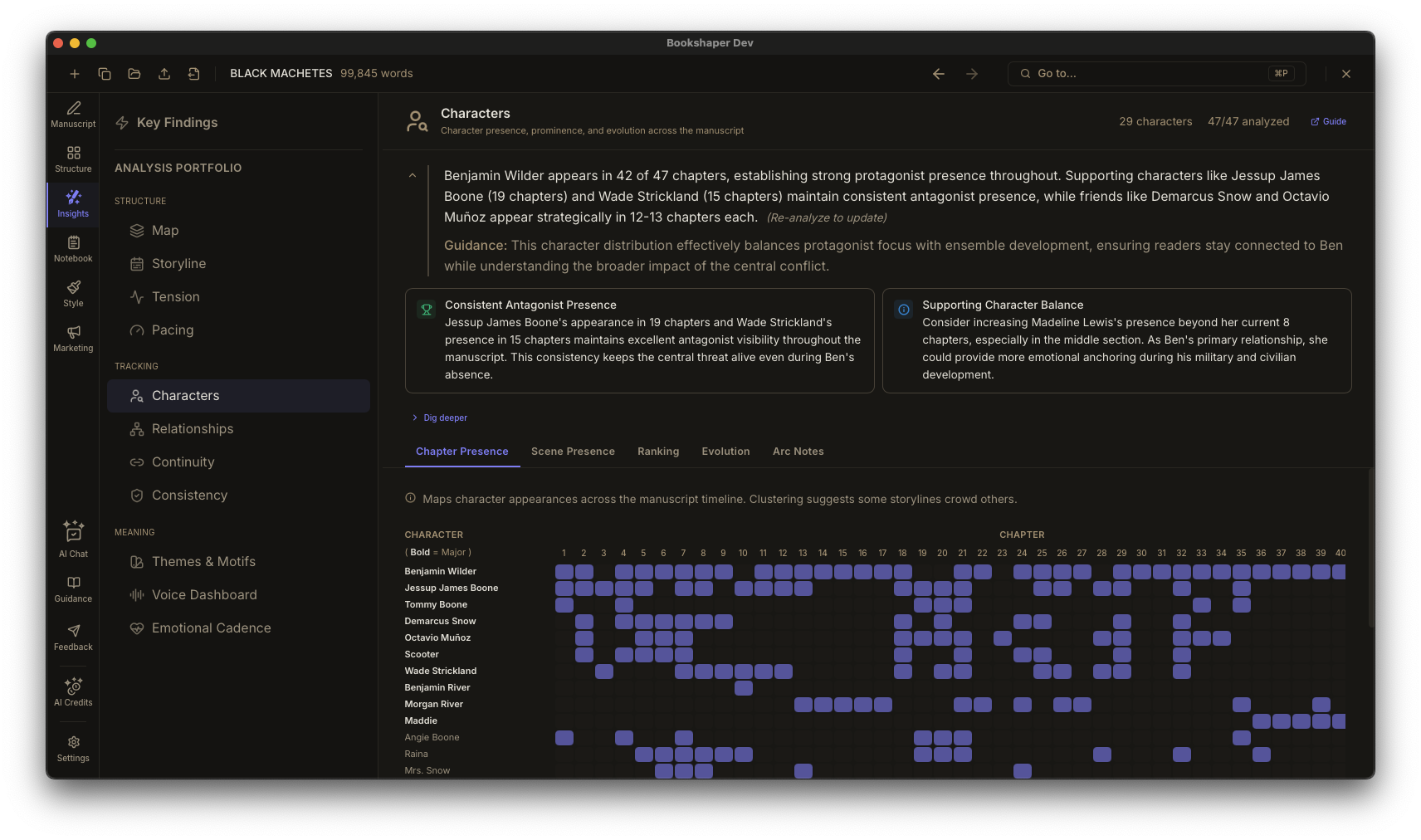
Manage character profiles, track locations, and tag every scene with POV, timeline, and purpose. The character presence matrix shows you exactly who appears where—and the continuity engine catches gaps before your readers do.
- Character profiles with AI-inferred summaries and aliases
- Character presence matrix—toggle who appears in each scene
- Character relationship map—interactive force-directed graph of character connections
- Location management with scene linking
- Scene metadata: POV, timeline type, purpose tags, tension level
- Contextual scene continuation—see prior scene context when starting a new scene
- Continuity flags for timeline violations and character inconsistencies
- AI-derived character inference from manuscript content
The evidence behind every finding
Visual Dashboards
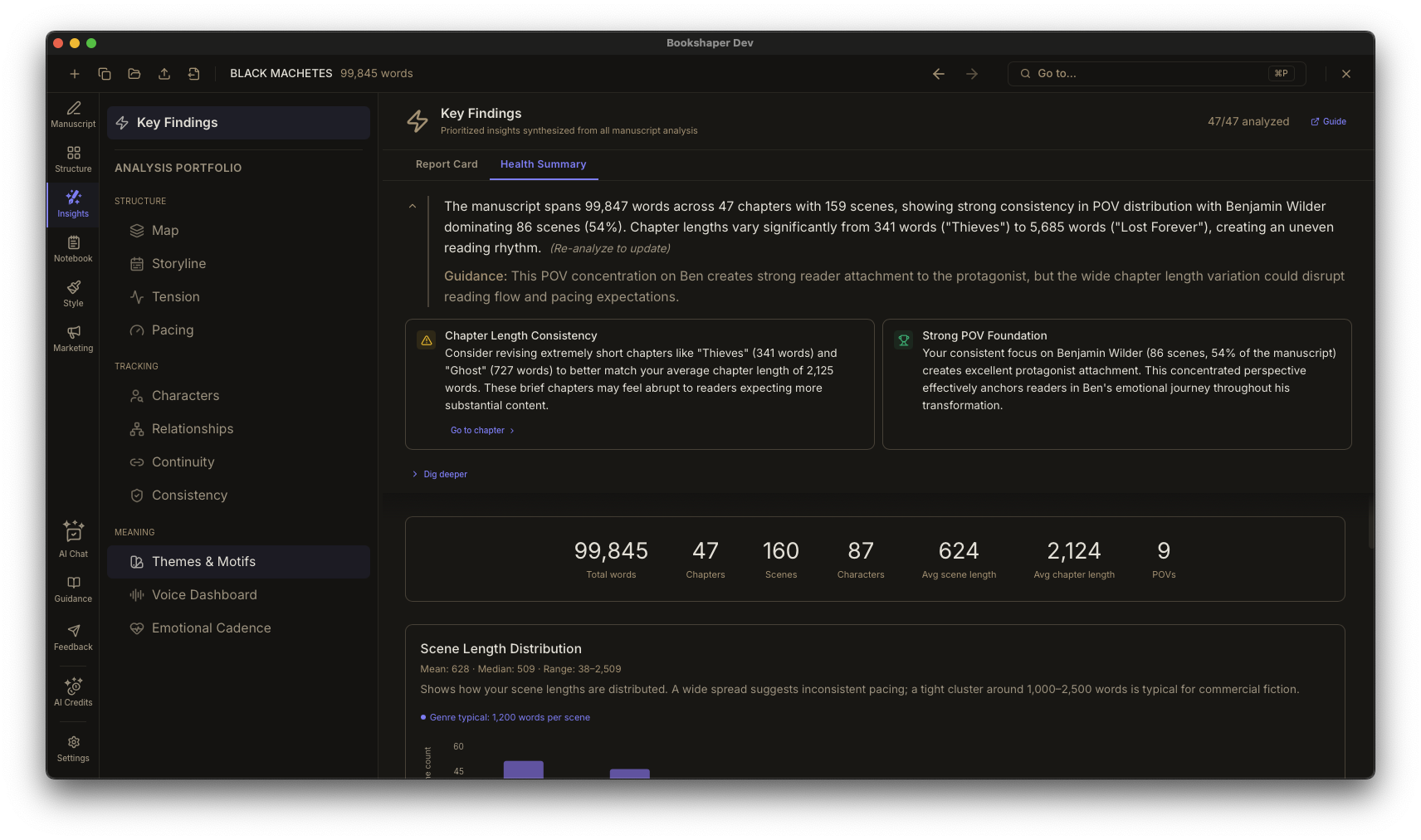
Every coaching finding is backed by interactive charts you can explore yourself. See the shape of your story through word count distribution, chapter balance, POV patterns, dialogue ratios, tension plots, and pacing heatmaps—and click any data point to jump straight to that scene.
- Health summary dashboard with stats and visual breakdowns
- Word count analytics and scene length distribution
- Chapter balance bar charts with genre benchmarks
- POV distribution donut chart with storyline strip
- Dialogue vs. narration ratios per chapter
- Tension plot across your entire manuscript
- Pacing heatmap for visual rhythm analysis
- Timeline view with scene nodes by word count and POV
- Writing goals with daily targets, session tracking, and streak history
- Click any chart element to jump directly to that scene or chapter
Your story bible, right next to your manuscript
Research Notebook
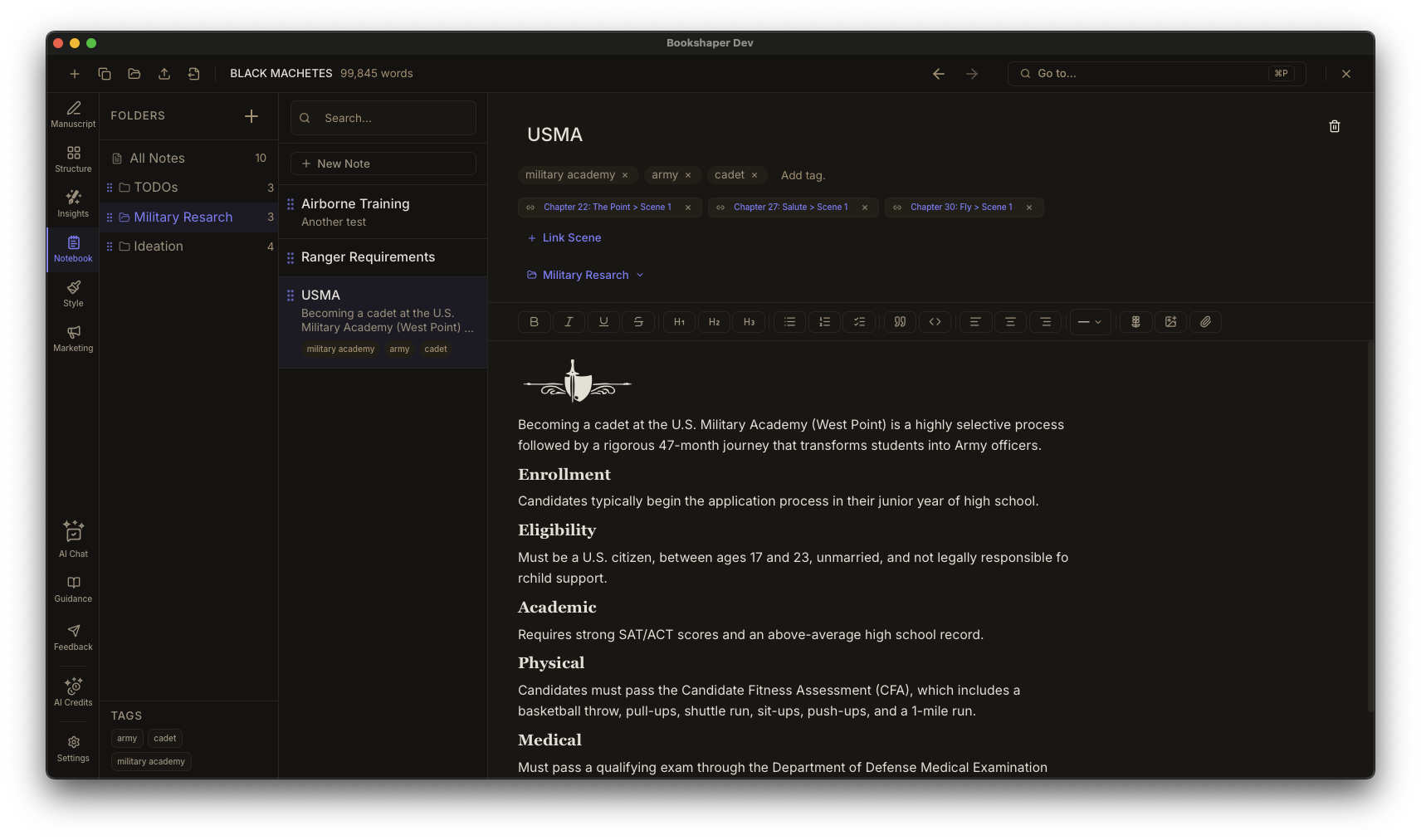
Keep character backstories, worldbuilding notes, plot outlines, and research organized in folders with tagging and full-text search. Link notes directly to scenes for contextual reference while you write.
- Hierarchical folders and rich-text notes
- Attach research files—PDFs, images, web archives, and text files with inline preview
- Tagging system for fast retrieval
- Scene linking—attach notes to specific scenes
- Full-text search across all notebook items
- Character, location, and plot reference notes
Design your book’s look without a separate tool
Style & Templates
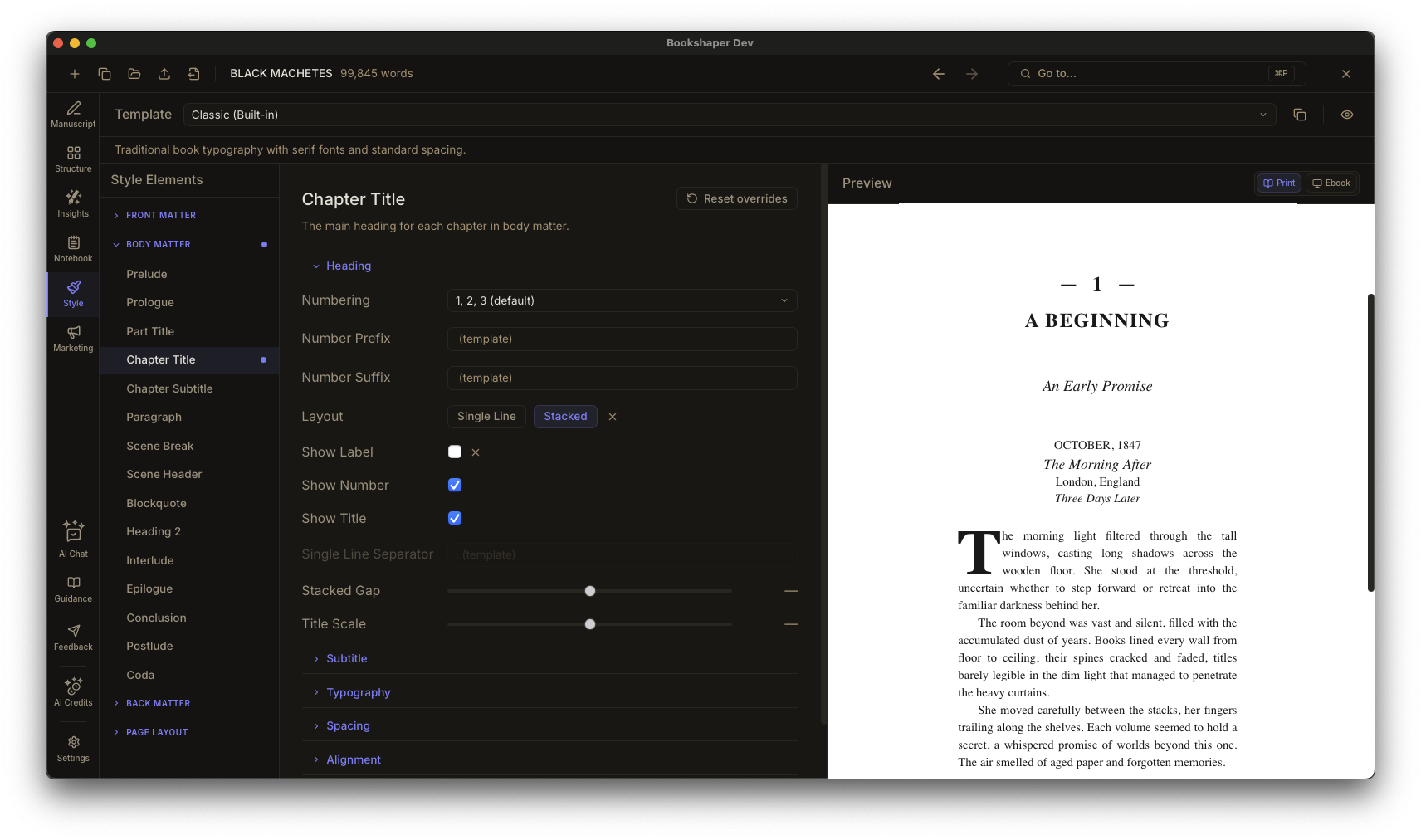
Pick a starting point from 60 built-in templates organized by genre and era—Modern Literary Fiction, Commercial Thriller, Contemporary Romance, Epic Fantasy, Cozy Mystery, YA / Crossover, Victorian Classic Reprint, Mid-Century Pulp / Noir, Memoir & Narrative Nonfiction—plus submission and accessibility formats. Customize typography, spacing, margins, running headers, ornamental decorations, and hyperlink appearance across dozens of style targets. Preview in real time for both print and ebook formats.
- 60 built-in templates across 9 genre / era categories, plus submission and accessibility formats
- Side-by-side template comparison preview before you commit
- Custom templates from scratch or by cloning any built-in
- Dozens of style targets across front matter, body, back matter, page layout, and inline elements (links)
- Typography controls: font, size, weight, line height, letter spacing
- A large built-in ornament library for chapter headings and scene breaks
- Running headers and footers with token-based content
- Print-specific controls: widows, orphans, hyphenation, gutter, bleed
- AI-generated style profiles (ESP) that capture your writing’s voice signature
- Style drift detection—see when your prose diverges from your established voice
- Preset stacking with conflict resolution for layered style configurations
- Real-time preview toggle between print and ebook
From manuscript to publication-ready file
Export & Publishing
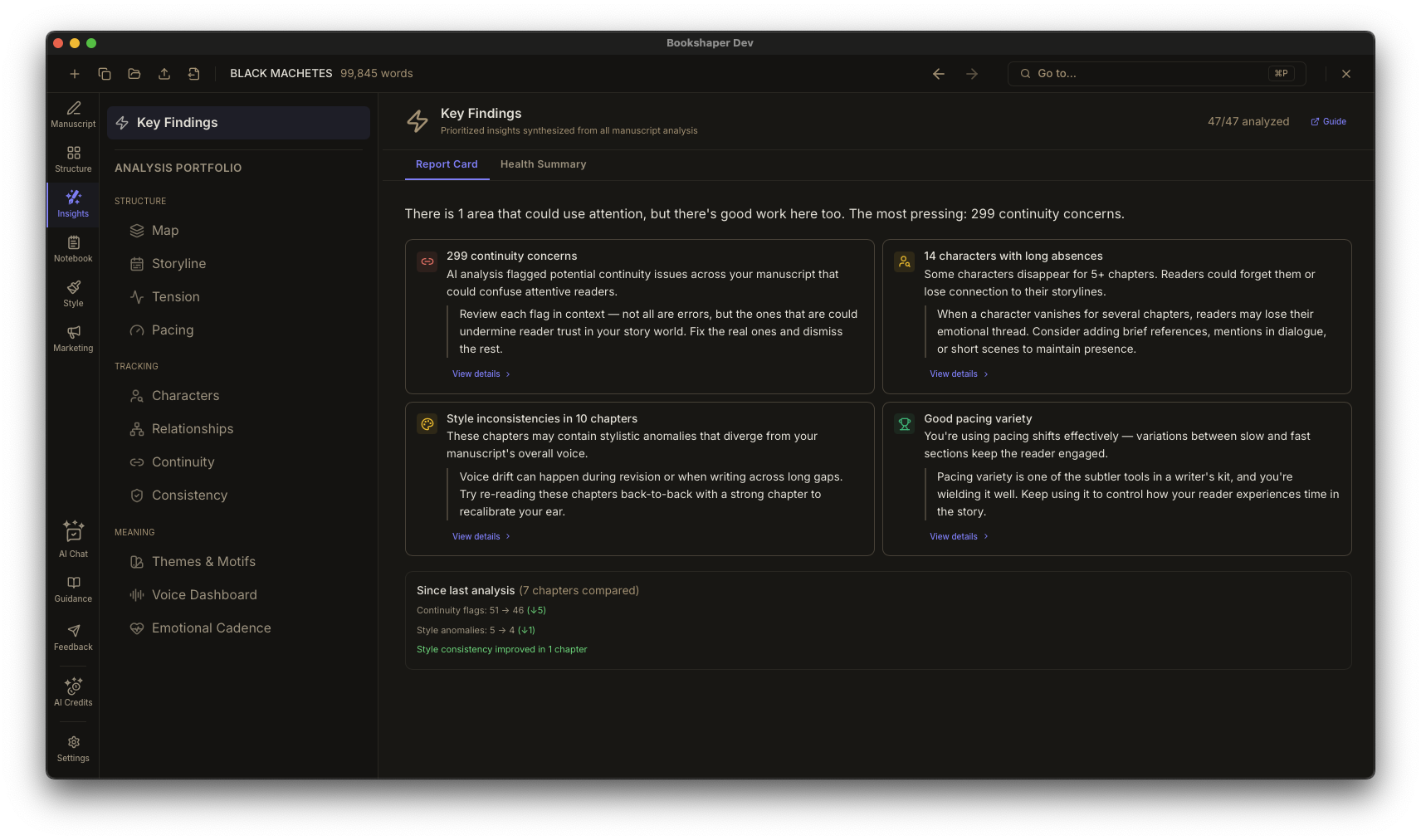
Import from DOCX, EPUB, or Markdown. Generate AI-powered marketing blurbs—back-cover copy, retailer descriptions, and taglines—with built-in analysis and refinement feedback. Design book covers in Cover Studio with front cover, back cover, and spine design—start from AI-generated concepts or bring your own artwork, then export a print-ready KDP wrap PDF in one click. Export to EPUB, PDF, or DOCX with full typographic control. The same manuscript and settings always produce the same output—no surprises.
- Import from DOCX, EPUB, and Markdown
- AI-powered marketing blurb generator (back cover, retailer description, tagline)
- Blurb analysis with scoring, strengths, and actionable suggestions
- Cover Studio—design front covers, back covers, and spines with AI-generated or custom artwork
- Print-ready KDP cover wrap PDF export—spine width computed from your page count and paper stock, bleed handled automatically
- EPUB export with reflowable text, CSS styling, and font embedding
- PDF export with print-ready margins, bleed, and gutter settings
- DOCX export for compatibility with editors and agents
- Style-aware rendering using your chosen template
- Front and back matter included and correctly ordered
- Project archive export and restore—share or back up your entire project as a ZIP
- Deterministic output—same input, same result, every time